Horizon Mouse
A scroll wheel only rolls. Horizon replaces it with one puck that turns, tilts and slides, so 3D and video work stays on the mouse.
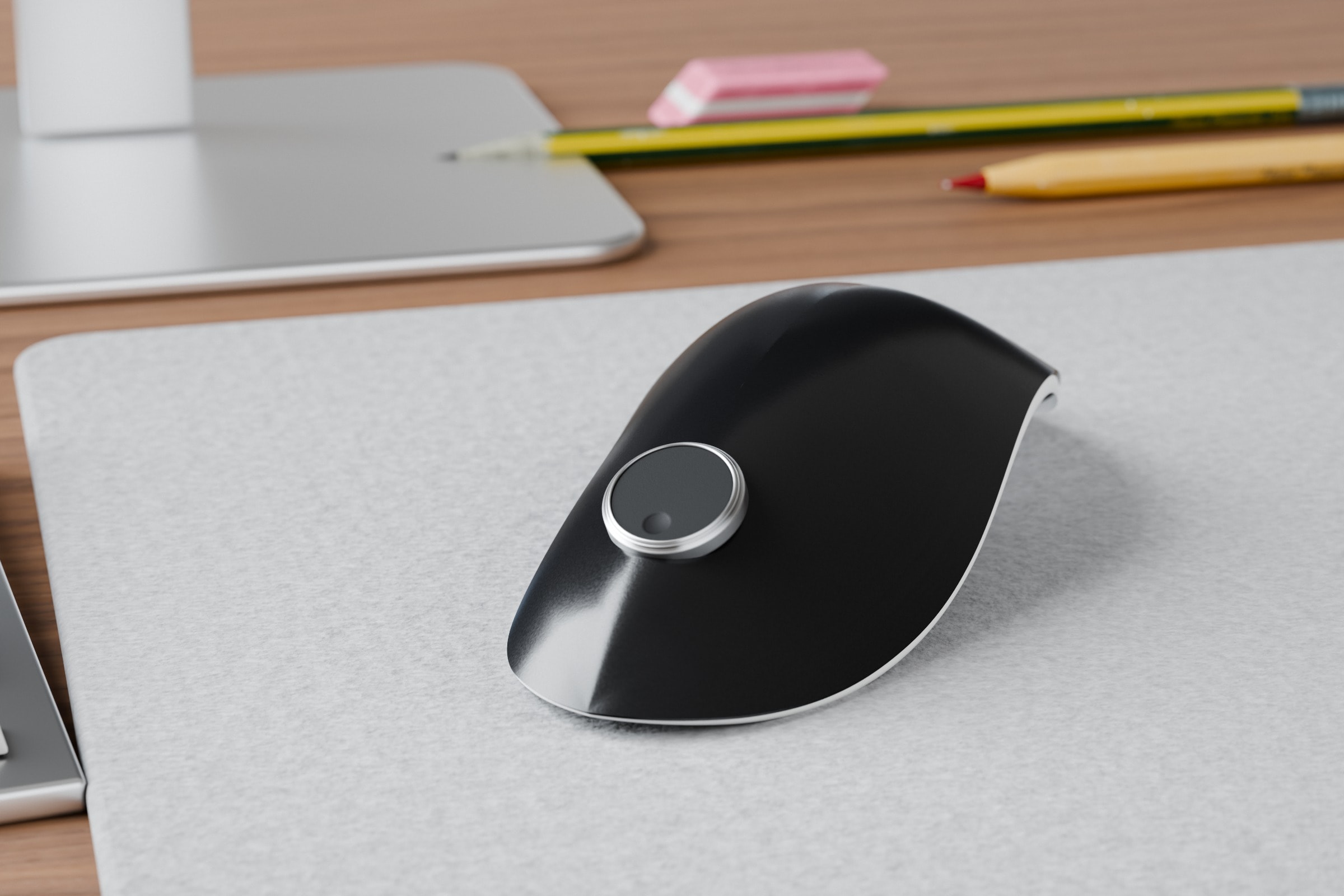
Model 11 at real size, rendered in Blender for this site. A render, not a photograph.
- The problem
- In Blender and Premiere, orbit, pan and frame steps take a held button, the keyboard or a second device.
- The bet
- Move those jobs onto one puck on the mouse, one motion each, so your hand stays put.
- Where it stands
- Designed and sized on paper. A print and a five-person test come next.
Try the puck
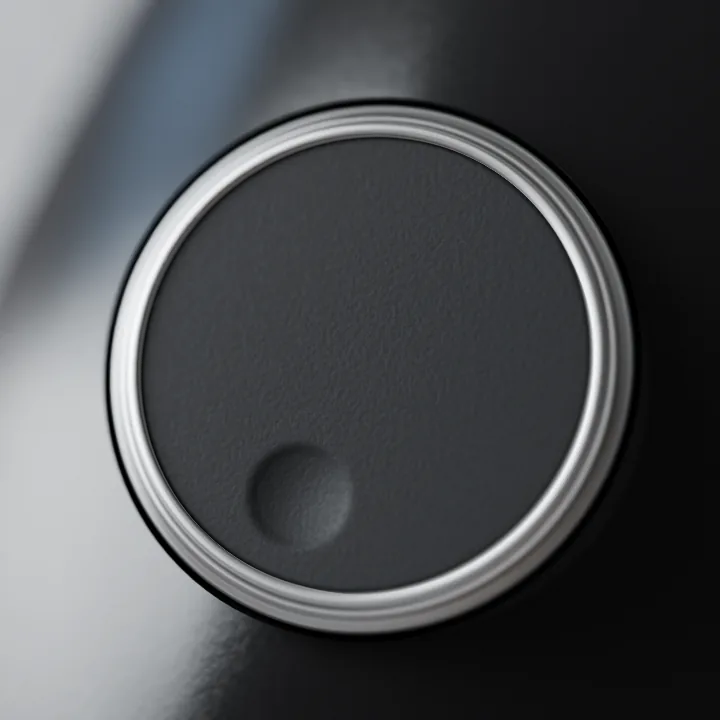
Scroll over the puck to turn. Drag the face to slide. Drag the ring past its guard to tilt. Click to press.
Line 12 of 40
A simulation built from my renders. No working puck exists yet.
Left and Right arrows turn one click. Up and Down slide. Hold Shift with an arrow to tilt. Enter presses.
The mouse hand does the most work, and the wheel can’t help
Blender
Orbit is a middle-button drag. Pan adds Shift.
Premiere Pro
Frame steps and shuttle live on the keyboard.
A second device
$179 to $199.99, and it takes your other hand.
The mouse hand already carries the load. In 3D and video work you move the view constantly. In a 1998 survey of CAD operators working five or more hours a day, 49% of those who always moused with one hand had hand or wrist symptoms on that side within a year. On the other side, 13% did. It measured symptoms, not navigation.
The pain is real but modest. Of 38 forum posts found by AI research, 9 describe it, 5 love their second device and 6 want more navigation under one hand. 18 push back, and none asks for a puck.
Horizon doesn’t ask the hand to do more. It shrinks the clumsy work: the held button, the reach for the keyboard and the second device each become a small finger move on the puck. In my estimate of two common tasks, Horizon cuts the trips to the keyboard from 2 to 0, at about the same speed.
What forum users say
“For me it was more about comfort and to get away from constantly scrolling a mouse wheel all day every day!”
“Literally can’t use any other mouse because that thumb scroll is so crucial for navigating a timeline”
Pushback
“keyboard navigation is just faster”
One puck, one motion per job
On day one, turning does what your wheel did.
Turn
Stays where you leave itA click every 15°, 24 per turn. Each click is one frame or one zoom step, and it stays where you leave it.
- Blender
- Zoom, a step per click
- Premiere
- Step a frame per click
- Everyday
- Scroll up and down, like a wheel
- Learned
- Day one
Tilt
Springs backUp to 8° and springs back. Tilt further, move faster. It acts only past a firm push.
- Blender
- Orbit, faster with more tilt
- Premiere
- Play or rewind, faster with more tilt
- Everyday
- Auto-scroll, faster with more tilt
- Learned
- After week one
Slide
Stays where you leave itA fingertip slide across the matte face. Where the finger stops, the view stops.
- Blender
- Pan
- Premiere
- Move along the timeline
- Everyday
- Scroll sideways
- Learned
- First week
Press
A clickThe puck dips 1.5 mm, about the thickness of a US penny.
- Blender
- View selected
- Premiere
- Play or pause
- Everyday
- Middle click
- Learned
- Day one
Starting values, to test on a working build.
The hard part: a turn must never become a tilt. A finger turning the ring can also push it sideways, the same worry that made me cut the joystick.
So three layers keep them apart:
- A firm push first. Tilt starts only past a spring set well above the sideways push of a turning finger.
- A flat centre. Small wobbles near level do nothing.
- Turning wins. While the ring turns, and for 0.15 s after each click, tilt is ignored. Turning itself never waits.
How should one puck do several jobs?
One motion per job: turn, tilt, slide, press
Not chosen
A thumb joystick, in my first design (2025)
Used with the scroll and the touch face, it could slip into joystick moves by mistake.
Cost I accepted
Speed control takes longer to learn. The firm push is untested.
A low shell, so a fingertip reaches the puck
I drew the shape first, in 2025, before anything under the puck.
How should the shell sit under the hand?
Low and flat, for the fingertip
Not chosen
A rounder shell
Sideways scrolling strains more: note 1 on my sketch.
A taller, upright shell
I wrote in 2025 that flatter is better for “wrist movement and finger reach”.
Cost I accepted
More forearm twist than an upright mouse: 42° against 28° in one study.
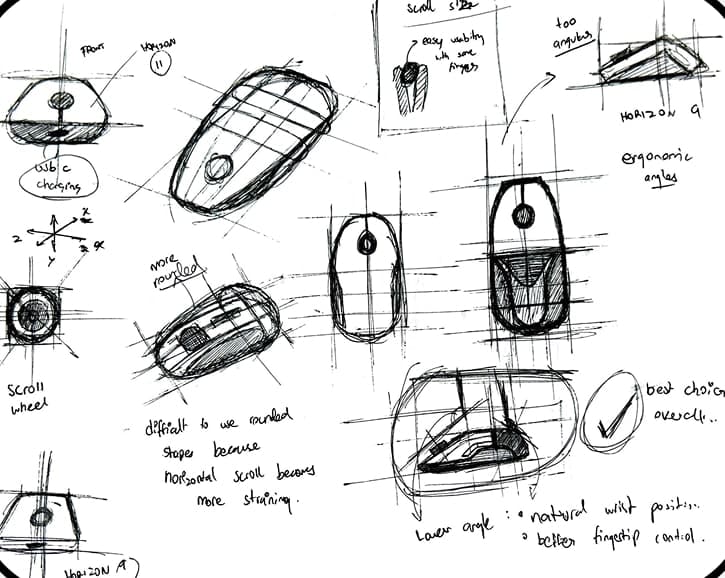
- A rounder shell: “horizontal scroll becomes more straining”.
- A lower angle: “natural wrist position”.
My first puck was too small
Scaled to a real mouse, it’s 16.9 mm across, a 14.4 mm face inside its ring. A fingertip covers most of it, so there’s no room to slide.
My CAD had no real size, so I scaled it to my benchmark, the 124.9 mm MX Master 3S. Of the test pucks, only 32 and 36 mm leave a 20 mm finger 5 mm to slide. A small motor under the ring, like the open-source SmartKnob, would let each app set its own clicks. It is 32 mm wide, so it needs a 36 mm puck.
That leaves about 4.5 mm a side, too little for a button. So the clicks don’t sit beside the puck. They run back from it, where the shell is widest. The puck sits in a notch between them, where a wheel sits today. The print will show if the reach is comfortable.
What would prove me wrong
Nothing is tested yet. Each claim I can test has a pass mark, set before any test.
| Claim | Status | Pass if |
|---|---|---|
| People read the map without a manual | Not tested | 4 of 5 guess turn and slide, 3 of 5 guess tilt |
| A turn never becomes a tilt | Needs a working build | 20 people turn 100 times each: at most 1 accidental tilt per 1,000 clicks, and 19 of 20 deliberate tilts, even right after a turn, work first try |
| No reach for the keyboard | Needs a working build | 4 of 5 finish the Blender task without it |
| It fits real hands | Print next | 4 of 5 pick the same puck, with 5 mm to slide |
What I learned
I designed the outside first, and the puck paid for it. Now I size the moving parts before the shell.
Next
Now
The print, then five hands
Print it. Then five people guess the motions and pick a size, against the marks above.
Later
A working build
Real clicks and a guarded tilt, to test what a print can’t.
The shape was the easy part. The real test is whether a hand reaches for the puck without being told how.
Sources
Show every sourceLess
The research behind this page, with each source and how sure it is: studies, makers' pages, measurements from my CAD, and what people told me. Design values I set myself are marked as targets.
Research findings
- "Orbit is a middle-button drag. Pan adds Shift." Blender manual, 3D Viewport navigation.
- "49% ... against 13%." Jensen and others, Scandinavian Journal of Work, Environment and Health, 1998, 149 CAD operators: "For the CAD operators who always used the same hand to operate the mouse, the 12-month prevalence of symptoms from this hand or wrist ... 49%"; in the other hand or wrist, 13%. A survey from 1998, not a study of navigation.
- "A firm push first." Primax, US patent 8,564,537, a tilt-wheel mouse: tilting needs a force "greater than the first elastic force", and rotation and swing "do not occur simultaneously". A patent, with no force values.
- "A flat centre." Balakrishnan and others, The Rockin’Mouse, CHI 1997: a "flat spot" lets the device control "only two degrees of freedom even while sensing four".
- "Turning wins." 3Dconnexion SpaceMouse Pro manual, Dominant: "restricts the pan, zoom or, rotations to a single axis." The 0.15 s is my design value.
- "Speed control takes longer to learn." Zhai, 1998: "Rate control is an acquired skill."
- "42° against 28°" and "4.2 against 3.4 seconds." Quemelo and Vieira, 2013, 16 people, a standard against a vertical mouse.
- "13 to 20 mm wide at the last joint." Index finger breadth, women’s 5th to men’s 95th percentile, Royal Australian Navy survey (DST-Group-TR-3564). It is joint width, not fingertip pad width.
- "The motor is 32 mm across." Scott Bezek, SmartKnob README: a "32mm rotor".
- The press, "about the thickness of a US penny" (in the motion rows). The US Mint lists the one-cent coin at 1.52 mm thick.
Market
- "124.9 mm." Logitech’s MX Master 3S spec sheet: 124.9 x 84.3 x 51 mm.
- "$179 to $199.99." Makers' US pages, Oct 2026: 3Dconnexion SpaceMouse Compact $179.00, Logitech MX Creative Console $199.99.
- "it takes your other hand." 3Dconnexion describes its setup as "a 3D mouse in your left hand and a conventional mouse in your right hand."
The renders
- The hero's room is free CC0 assets from Poly Haven. Model 11 is shown at 124.9 mm long, my benchmark's length.
Measured from my CAD
- "16.9 mm across" and the fit study. Model 11 at 124.9 mm long, a length I chose: the CAD file carries no usable real size. The 1.8 mm wall is assumed.
- The working numbers. Widths are the top-view outline at each point. The print files set the 2 mm ring.
My estimate
- The rough time estimate in the appendix: a Keystroke-Level Model of two tasks. Its error is about 21% per task (Card, Moran and Newell, 1980), so neither version is measurably faster.
What forum users say
Read in Oct 2026 by AI research agents: 38 public forum posts. 9 describe the pain, 6 want navigation on the mouse itself, 5 love a second device, and 18 push back. None asks for a puck on a mouse. Reddit threads were read through a public archive. Full list: the research note behind this page.
- "to get away from constantly scrolling a mouse wheel all day every day." r/Fusion360, 15 Jan 2026 (score 23), on why they use a SpaceMouse.
- "so crucial for navigating a timeline." r/davinciresolve, 16 Mar 2025 (score 14), on the MX Master’s thumb wheel.
- "keyboard navigation is just faster." r/blender, 23 Mar 2026.
- The Rotary Mouse: its maker’s page, rotarymouse.com, Oct 2026: a wheel that "can perform the same function as a jog/shuttle controller".
What people told me
- In 2025 I asked 35 to 40 people, professors, friends, family and strangers, how they use a mouse. A few said a regular mouse already fits their work. Not recorded.
Design targets, not tested yet
- The input map, the three layers that keep a turn from becoming a tilt (the gate’s force, the flat centre’s size, the 0.15 s), the spec values marked "to test", and the puck sizes.
- "On day one, turning it should do what your wheel did." The learning plan.
Appendix
Show the appendixLess
A rough time estimate, before testing.
| Task | Mouse and keyboard | Horizon | Saved |
|---|---|---|---|
| Blender: orbit to the back, pan right, frame the selection | 7.85 s, 2 trips | 6.85 s, 0 trips | 1.0 s |
| Premiere: step 10 frames, then play | 5.70 s, 2 trips | 4.90 s, 0 trips | 0.8 s |
| Premiere, with Shift and the arrow keys | 4.50 s | 4.90 s | Horizon 0.4 s slower |
Card, Moran and Newell (1980), Kieras, and my task models
Why not a vertical mouse?
Keep the mouse people know, and change one part: the wheel
Not chosen
A vertical mouse
It changes how the hand sits, not what the fingers do. Orbit and frame steps still go to the keys. It was also slower in one study: 4.2 seconds per target, against 3.4 for a standard mouse.
Cost I accepted
It doesn’t change wrist posture. That is a vertical mouse’s job.
The working numbers.
| Working number | Value | Where it’s measured |
|---|---|---|
| Length | 124.9 mm | Chosen: the MX Master 3S length |
| Widest point | 52 mm | Top view |
| Width at the puck | 43 mm | Top view, where I drew the puck |
| Width at the motor’s puck | 45 mm | Top view, 3.5 mm further back |
| Height | 33 mm | Side view |
| Puck as drawn | 16.9 mm | My 2025 CAD, at this length |
| Test pucks | 24, 28, 32 and 36 mm | Each a face inside a 2 mm ring |
| Smallest puck for the motor | 36 mm | Around a 32 mm motor |
| Product | What it does | What it lacks |
|---|---|---|
| Logitech MX Master 3S | A thumb wheel for sideways scroll | One sideways axis, even remapped. No tilt or slide. |
| Logitech MX Creative Console | A dial and keypad for creative apps | A second device beside the mouse |
| 3Dconnexion SpaceMouse | Six axes on one cap | A second device, for the other hand |
| Contour ShuttlePRO v2 | A jog wheel and shuttle ring for video | A second device |
| SmartKnob (open source) | Clicks and end stops set in software | A knob, not a mouse |
| Rotary Mouse (crowdfunding, 2026) | A clicking dial on top of a mouse, for scroll and jog | Turn only. No tilt, no slide, no 3D orbit. |
Makers' pages, checked Oct 2026